

👋 Welcome to Ruckus Makers. Play-It-Safe Principals accept permission-based development. Ruckus Makers do not. Instead they practice the Art and Science of Selfmentorship. Each month we publish mini-books that teach Selfmentorship. Subscribe below and you’ll know the moment a new one drops ⚡️
Imagine this: School’s about to start, and you’ve got one shot at the first staff meeting.
The district sent you a slide deck that has too much text and information.
You know by the third slide, you’ll lose the room before the year even begins. But you want this year to be different. You want the meeting to be meaningful, to encourage and inspire staff to be the best versions of themselves for the students?
You don’t have to work it out alone.
Let’s say you start a conversation with Digital Danny—an AI Selfmentorship tool trained on years of coaching conversations with school leaders—and tell him straight:
“I’m worried this meeting will be all logistics and no soul. How can I make it set the right tone for the year?”
He doesn’t hand you an agenda, but he does suggest a specific structure. The first half can be about culture and vision: why you’re here, what you see in your staff, and what you believe is possible for them this year. Make it possible and personal. The second half is about logistics, framed as service to something bigger, not just a list of rules to get through.
Then, he says something you already knew but needed to hear again:
Your staff won’t remember logistics. They’ll remember how you made them feel.
They’ll remember if you treated them like partners, or just handed them a manual.
To help you do that, he points you to the Positive Spotlight tool and tells you to open with a story or a moment instead of a slide. So, you decide to ask your staff questions instead of handing them answers. You make a note to save the heavy logistics for a follow-up memo. When you’re ready to build the agenda, Digital Danny gives you one, timestamped for ninety minutes, and recommends you start with a check-in question instead of the throwaway “how was your summer?” Something like: What’s one thing you’re proud of from last year? Or what do you want to protect about school this year?
If you’ve run staff meetings for ten years, you’d still walk away with something new.
Digital Danny is someone in your corner who’s trained on 10+ years of coaching conversations with school leaders. That means when you bring him a problem, you feel like someone is sitting across from you, helping you work through it.
I Asked AI to Fix My First Staff Meeting—I Wasn’t Ready for the Answer
There are roughly 91,900 principals in this country. As one of them, you’re doing a job that used to take five people.
You’re an instructional leader, a culture keeper, a crisis manager, a politician, and the one person your staff looks to on the hardest day of the year. You don’t have a massive admin team backing you up—you’re the leadership.
That responsibility is a heavy weight.
It also prevents you from getting help with personal development.
One principal I respect, Bill Renner, once told me he waited years to get leadership support because he didn’t want to bother people. He knew everyone else was busy too. So he kept going through the motions alone, hoping he’d figure it out eventually.
That reminded me how isolated and underdeveloped I was as a new administrator, and how hard the job was for me back then. Mastermind and one-on-one coaching have helped me and so many other principals. I’ve watched it change careers, including my own. But not everyone can put $3,500 toward a mastermind or find room in their schedule for a weekly coaching call.
That gap has bothered me for years.
I wanted the same kind of thinking partner I got to build with my coaches, minus the price tag and the waitlist. That’s part of why I built Digital Danny. He’s an always-on AI tool, designed to help you think through situations that previously required a coach, mentor, or peer.
Here’s a small sample of what’s possible with Digital Danny:
Bill Renner used it to prepare for his return to elementary school, working through the questions to ask a new team of teachers.
Kati Cahill used it to turn a year of scattered wins into a repeatable template she now pulls from for staff meetings, newsletters, and parent tours.
Fred Holmes used it to get honest about the story he was telling himself before a hard conversation with a direct report, so he could walk into the meeting with a clear head.
This mini-book will show you how you can do the same.
Digital Danny: The AI Thought Partner for Principals
Digital Danny is designed to guide you through the everyday thinking, deciding, and communicating that comes with leading a school.
Think of it as a peer and mentor, trained on thousands of leadership calls.
It lets you talk through any leadership challenge, at any time of day. On the drive to work, you could ask how to handle an unexpected call from the superintendent’s office. At nine at night, you can use it to write a message to a parent who’s escalating a complaint about a teacher. During lunch, you can chat with it about a staff member who pushed back hard on a decision you made.
Most principals have an a-ha moment when they think through a problem out loud.
Digital Danny gives you a way to hear yourself think when no one else is around.
It also forces you to look at how you’ve been doing your own development. Are you a Play-it-Safe Principal who waits for the district to send you somewhere, hoping a conference covers what you’re struggling with? Or do you practice the art of Selfmentorship and drive it yourself, on your own schedule, with someone in your corner who’s never too busy to talk?
Either way, I’m not here to judge.
I just know what worked for me.
When I was a principal, it took me years to drive my own leadership development. I went to conference after conference, trying to meet the right people and grow my skills. I put together peer circles and monthly meetups. I started a podcast to interview school leaders and collect knowledge. I created a community and designed a mastermind.
But honestly, I could have benefited from having more Selfmentorship tools.
So, I built Digital Danny not only to help me, but also thousands of other school leaders. I trained Digital Danny on the Better Leaders Better Schools podcast, the Ruckus Maker Club Mastermind content, one-on-one coaching calls, and all six books I’ve written on school leadership. It made the tool knowledgeable. But if you’ve ever gotten advice from someone trying to cover every angle at once, you know how that goes. It was verbose, but not particularly useful.
Eddie Yoon, a co-founder of Category Pirates and someone I’ve learned a lot from, gave me the fix: Stop trying to make him excellent at everything, and give him specific jobs to do instead. So, I thought through the daily problems principals need help with.
Four jobs kept showing up:
Think It Through. You’re facing a problem or a project, and before anything else, you need help sorting out what you’re dealing with.
Apply a Tool. Sometimes, you need someone to point you to the right framework and walk you through it. So, I added more than 30 frameworks to Digital Danny.
Reframe the Story. It’s easy to get stuck in a version of events that’s a little too biased toward how you see it. You need help zooming out to see it from someone else’s side.
Communicate It. This came from watching how principal power users used Digital Danny to refine messages that needed to land right, especially high-stakes ones.
This is also where Digital Danny splits from other AI engines.
What Makes Digital Danny Different
Ask ChatGPT, Gemini, or Claude about school leadership, and it’ll answer confidently, whether it should or not. Generic AI tools are designed to make you feel like the smartest person in the room.
Digital Danny is trained only on school leadership. Ask him something outside that lane, and he won’t guess. He’ll tell you he doesn’t know.
He also doesn’t train on your conversations. What you tell him stays between you and him. Every other AI model learns from what you feed it, which means your words become part of how it responds to everyone else using it. Digital Danny doesn’t work that way. And the tool is built into the Ruckus Maker Club—a private community and live events full of other school leaders working through similar challenges. No other AI tool can hand you that.
Digital Danny works if you’re willing to sit in the discomfort of being asked a question instead of being handed an answer.
It won’t work if you want instant answers with zero friction, need data analysis, or want a tool that flatters you into confidence instead of giving you clarity. It’s perfect if you want a thinking partner, not a task-doer. And if you’ve already bought into Selfmentorship as a practice, or are ready to.
If that sounds like you, here’s how to apply those four jobs.
Digital Danny Four Jobs Framework
Each job below includes an example from a school principal who frequently uses Digital Danny, plus a prompt you can copy straight into your own conversation.
Job 1: Think It Through
You have a problem and need to think deeply before acting.
When Bill Renner took a job as principal at an elementary school after years in middle school, he knew enough not to walk in with answers. He slowed down, started meeting with grade-level teams, and asked Digital Danny what questions he should bring to a first-grade team he didn’t yet know. The response: What are you most proud of? Where do you feel stuck? What’s something we should never change here?
To think it through, try this prompt:
“Here’s a situation I’m walking into: [describe it]. Before I decide anything, help me figure out what I need to understand first.”
Job 2: Apply a Tool
Digital Danny has more than 30 built-in frameworks, designed over a decade of teaching, coaching, and school leadership. You don’t have to know all of them or which one fits your situation—you just have to bring the problem.
This is where Kory Kliebert leans on Digital Danny for professional development. He’ll tell Digital Danny he’s working on culture with his team and needs a ten-minute personal development exercise. The reply includes frameworks and language relevant to his staff, not a generic answer he could get anywhere else.
To apply a tool, try this prompt:
“I’m working on [culture/PD/communication goal]. Is there a tool or framework that fits this? Walk me through it.”
Job 3: Reframe the Story
Sometimes you’re stuck in a version of events that’s a little too biased toward how you see it, and you need to see it from someone else’s perspective.
One principal, Fred Holmes, had a direct report who consistently showed up late, was unmotivated, and seemed checked out. Before he talked with his report, he brought the situation to Digital Danny. He wanted to understand what might be going on from the direct report’s side, not just stew in his own frustration. By the time he sat down to talk to his report, he had thought through their perspective from enough angles to have an open-minded conversation.
To reframe the story, try this prompt:
“Here’s how I’m seeing this situation: [describe]. Help me see it from the other person’s perspective. Where might I be wrong? Where might I be right?”
Job 4: Communicate It
You’ve got a message that needs to land, and you don’t have time to get it wrong.
Kory Kliebert uses Digital Danny to polish nearly every memo he sends. He’ll paste in his draft, and because the tool knows how to structure memos, he doesn’t have to re-explain himself every time. Fred Holmes does something similar before high-stakes moments. He rehearses interview answers with Digital Danny and gets direct feedback on how he sounds, not just what he says.
To communicate, try this prompt:
“Here’s a message I need to send: [paste it]. Help me tighten it, and give me a version that’s more direct and a version that’s more empathetic.”
Stack the Four Jobs
The Four Jobs work as one-off conversations. But once you’re comfortable with them, you can use more than one at a time. Here’s how Digital Danny users connect two or three jobs together across a bigger project.
Make a playbook from your brain dump (Think It Through and Apply a Tool).
Kati Cahill runs a small school without an admissions director, which means the admissions process lived entirely in her head. She’d always done it herself. But she talked it out with Digital Danny, and instead of a pile of paper checklists on her desk, she walked away with a mapped-out flow her team could run without her. She did the same thing with scheduling, something she’d kept doing herself even after she became principal. Both are now handoffs, not bottlenecks.
Turn your wins into a template (Think It Through, Apply a Tool, and Communicate It).
At the end of the school year, Kati dumped every win she could remember into Digital Danny—some from her own memory and some her staff had mentioned in checkout meetings.
Digital Danny suggested structuring it as a three-column template: what the win was, why it mattered, and when to use it. Now, she has a running reference she pulls from for staff meetings (”tell this story when you need to boost morale”), parent tours (”use this so they understand what small class sizes mean”), and newsletters. The writing still comes from her—Digital Danny doesn’t draft the newsletter—but it reminds her what’s worth sharing.
When a parent recently sent a thank-you email praising the staff, she added it straight to the template as a new entry she can pull up before a staff meeting to reset morale.
Run a framework (Think It Through, Apply a Tool, and Communicate It).
Kati had done a 90-Day Entry Plan as part of the Ruckus Maker Club Mastermind.
Previously, she had mapped it out freeform in a Google Doc, going wherever her thinking took her. This year, she went through it step by step with Digital Danny. She used the same backward-planning method, starting with her 90-day vision, but Digital Danny prompted her at every stage.
By the end, she had specific team members assigned to her Communication, Academics, and Culture columns, based on what the conversation with Digital Danny surfaced.
Get a second opinion on another tool’s answer (Reframe the Story).
Gene Park, one of our Ruckus Maker Mastermind coaches and a current elementary principal, runs his questions through ChatGPT and Digital Danny. He then asks Digital Danny, “What’s the good stuff here, and what do I need to cut?” He calls it his own mini mastermind with AI.
Every principal using Digital Danny opened the tool again and again, until it became part of how they think. One principal, Jess, had 808 conversations with Digital Danny in three months. Another had over a thousand. Most show up several times a day during the week, or run a sprint session when working through a particularly tough challenge.
Here are the basic steps to create your own Digital Danny Selfmentorship habit.
How to Start Using Digital Danny
Step 1: Choose your door.
Start by going to myprincipalcoach.com. You’ll see two ways to use Digital Danny: $100 for 90 days or $350 for the year—both include the Ruckus Maker Club and monthly Event Space jam sessions.
(If you’re already in the Ruckus Maker Club or working with me one-on-one, Digital Danny is included. Ask your coach or me how to get access.)
Here’s what it’ll look like once you’re logged in:
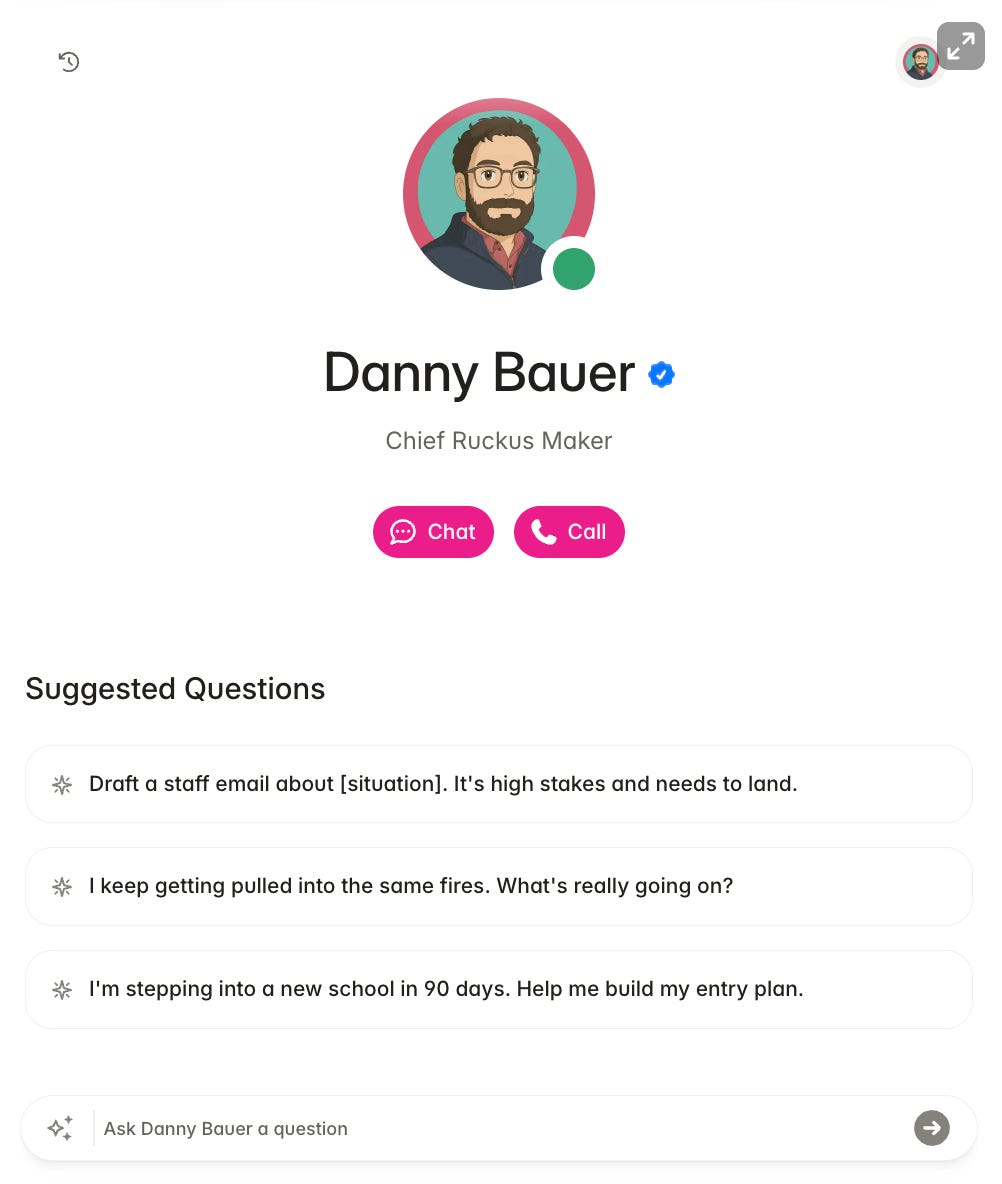
Step 2: Start with a real problem, not a hypothetical.
Digital Danny works because it’s specific.
“Help me think through hiring” gets a generic answer. “I have three teaching positions to fill at a school I don’t know yet, and I start in six weeks” gets you a specific way to think through the problem.
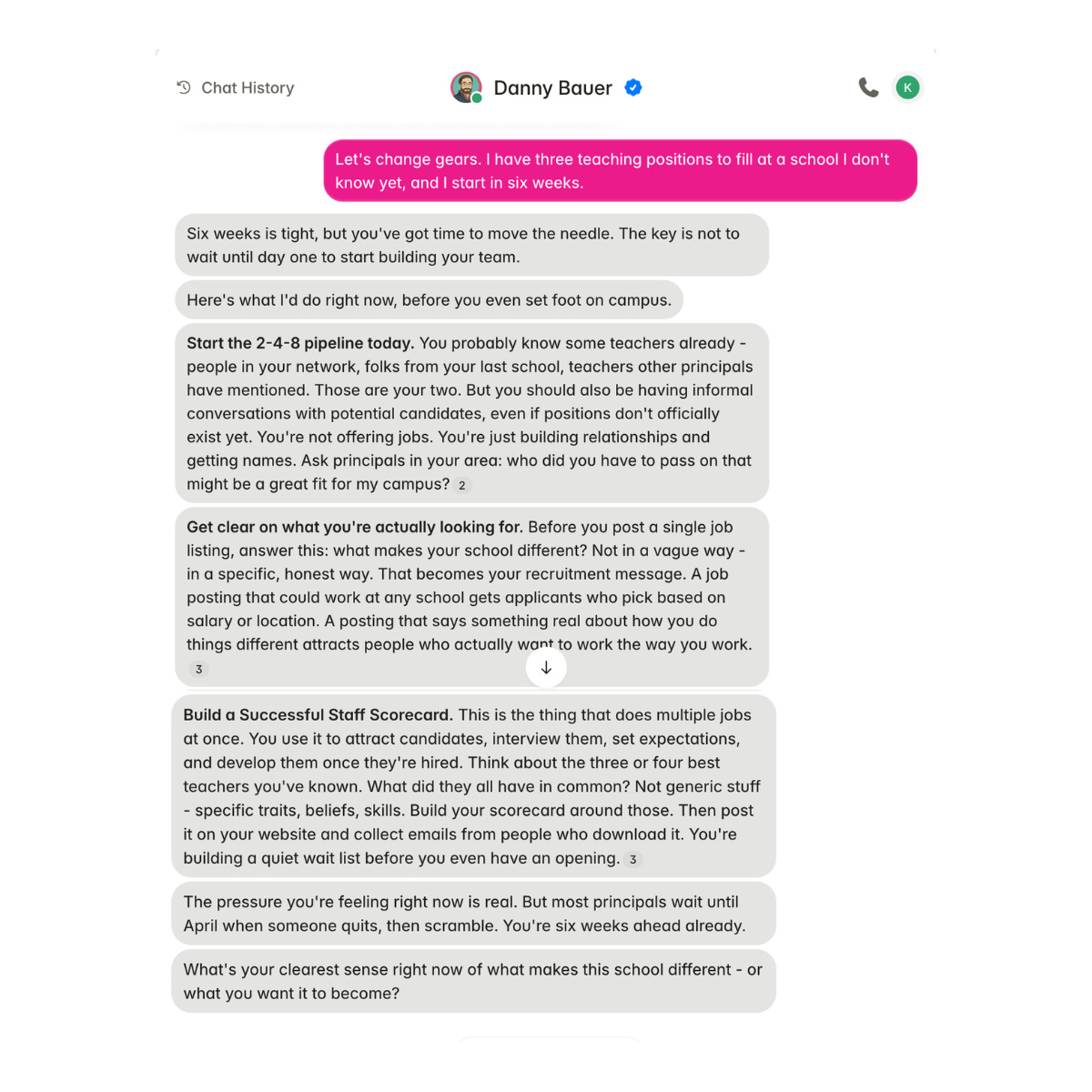
Bring a detailed problem that’s actually on your desk this week.
Step 3: Expect a question back, not an answer.
This is the biggest mindset shift.
Digital Danny gives you the answer in a roundabout way so you do the slow, deep thinking that helps you find an answer. In the hiring example above, Digital Danny didn’t hand over a checklist. He gave a timeline: start a 2-4-8 pipeline immediately, get specific about what makes the school different before writing a single job posting, and build a staff scorecard that helps attract, interview, and develop candidates once hired. He then asked a question back: What’s your clearest sense right now of what makes this school different?
Here’s what happens when you reply:
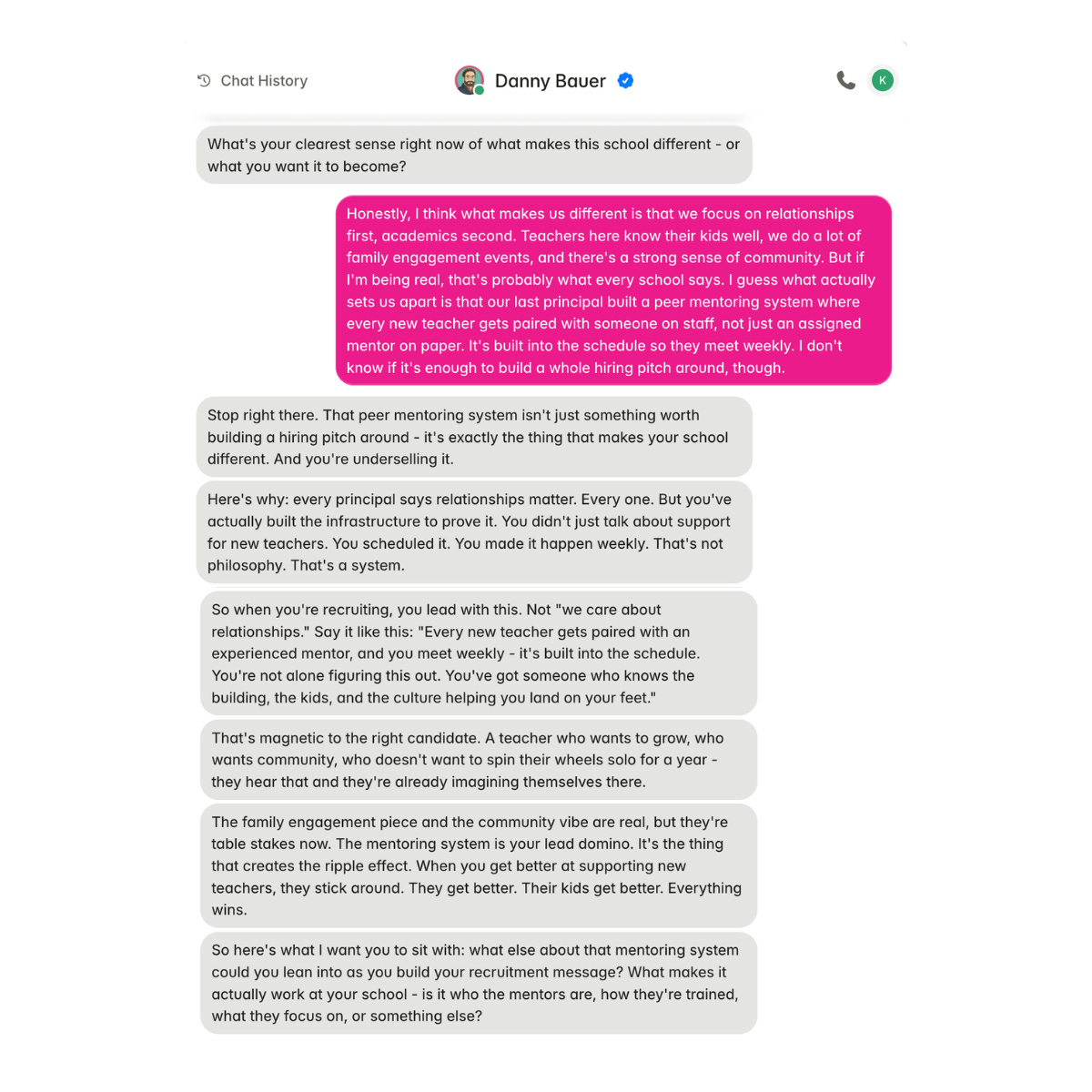
That’s the loop. You bring something half-formed, and Digital Danny finds the one thing buried in what you said, sharpens it, and hands it back better than you gave it to him. He then asks you to go deeper.
That back-and-forth is what it looks like to practice Selfmentorship.
Step 4: Show up regularly.
The principals who get the most out of the tool use it often.
For example, Fred Holmes talks to Digital Danny on his way into work most mornings to get clarity before the day starts, instead of walking onto campus and reacting to email and the news. Others use it before emailing a parent or having a tough meeting with a teacher.
When I looked at what principals bring to Digital Danny, five themes kept showing up:
Launching the school year. This was the most common topic. Principals used Digital Danny to make entry plans for a new campus, run the first staff meeting, create a personal development plan, write welcome-back letters, and hold new-teacher orientation.
Hard conversations, boundaries, and managing up. This included topics like setting boundaries with a supervisor, having the conversation you’ve been avoiding with a teacher, and working through a veteran staff member who’s checked out.
Naming the one thing. These messages were about belief statements, one-sentence visions, 90-day plans, and the Principal’s User Manual, usually built section by section instead of all at once.
Instructional leadership systems. This included walkthrough schedules, feedback that doesn’t feel like compliance theater, PLC structure and rollout, and coaching Tier 1 instruction.
Student behavior and discipline systems. These messages were about referral loops, PBIS protocols, cell phone policy, and backing up teachers who feel unsupported.
Underneath most messages is the same job: help me think through this situation and write a response, so it actually lands. Principals wrote letters, speeches, emails, meeting agendas, and surveys. Whatever the topic, most principals end up back at Job 4—Communicate It.
Treat it like a practice, not a one-time fix.
Step 5: Know the limitations.
Digital Danny works best as a thinking partner, not a data tool. If you need spreadsheets or analysis, that’s still a job for ChatGPT or Gemini.
He also doesn’t remember your conversations the way you’d remember a call with a friend. He holds onto the big picture but not the specific details. So if you want to reference something later, don’t count on him recalling it word for word.
That means you’re on your own for saving anything you want to keep. If you want to hold onto a conversation, copy and paste it into a separate note or document. Or, take a screenshot. Some principals do that after a good session, then add it to the Digital Danny chat for context when a similar situation comes around again.
Keep Making a Ruckus
Bill Renner, a principal and avid Digital Danny user, once told me something I haven’t stopped thinking about: Leaders don’t need to prove they have every answer. You just need to be willing to reflect, ask different questions, and keep growing.
Your growth trajectory will be different than every other principal. That’s not a problem to solve. That’s what Selfmentorship looks like—it’s a personal practice you build over time.
None of the principals in this mini-book started with a system. Kati didn’t set out to build a template. She just dumped a year of scattered wins into a conversation and let the structure find her. Fred didn’t plan to make Digital Danny part of his commute. He called him up once before a hard day, and it worked, so he kept doing it. Gene just got curious about what two different leadership tools would look like when combined.
The habit came after the results.
To start using Digital Danny, choose one thing you want to work through this week.
Maybe it’s a meeting you’re dreading, a message you’re not sure how to send, or the story you might be telling yourself about someone on your staff. No matter the situation, go to myprincipalcoach.com and let Digital Danny ask you a question.
Bring him that one thing, and see how he helps you think it through.
Keep Making a Ruckus,
Danny
If this landed for you, here are a few ways to keep going.
Meet Digital Danny. Digital Danny is your Selfmentorship guide. Always available. Never flatters. Evolves with you. Start your 7-day trial here.
Join the Ruckus Maker Mastermind. If you’re serious about Selfmentorship and want a community of Ruckus Makers doing the work alongside you, this is where they are. Learn more and apply here.
Listen to the Better Leaders Better Schools podcast. Over 10 years of conversations with the most interesting people doing the most interesting work in school leadership. Every episode is a Mirror Person who knows more than you about something you care about. Start here.